
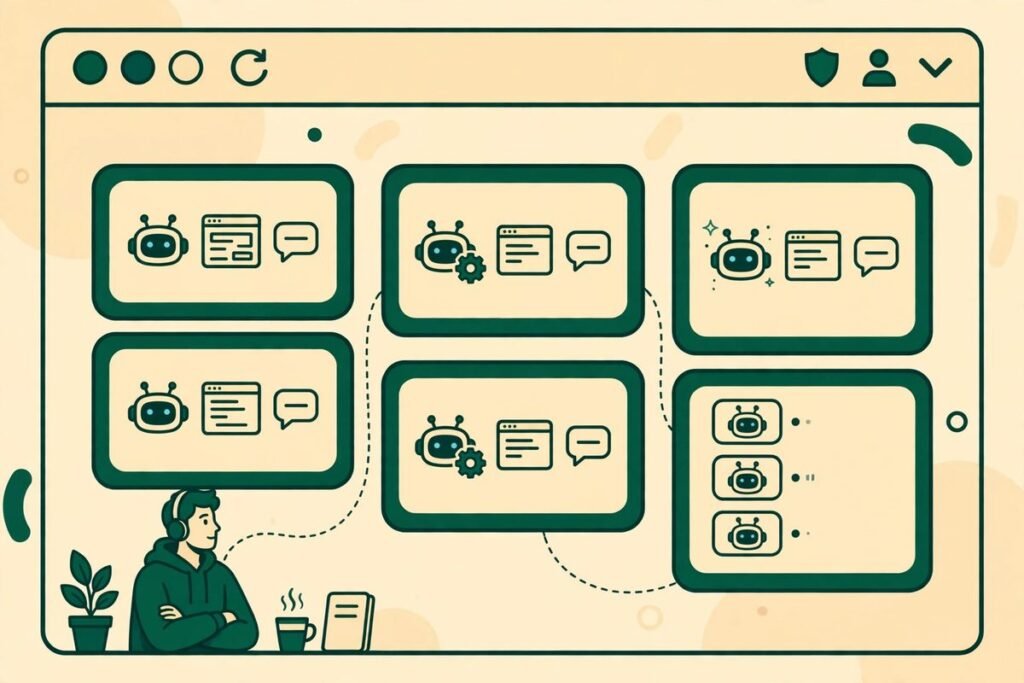
Tabsh browser tab IDE agents flip the usual developer setup on its head. Instead of pulling your browser into your IDE, tabsh brings your coding-agent sessions into your browser, where your issues, pull requests, documentation and localhost previews already live. The verdict up front: if you regularly run more than one coding agent and keep losing track of which one needs your attention, tabsh is a genuinely useful, free tool worth trying. If you only ever run a single agent in a single project, it solves a problem you do not yet have.
Tabsh is a small Rust daemon, published on Product Hunt on 25 October 2026, that puts all your coding-agent sessions across projects onto one Kanban board or list in the browser. Status updates arrive automatically through agent hooks, including the moment an agent needs your input. Everything runs locally on macOS and Linux, with no account to create and no server to trust with your code. It is free and MIT-licensed, so you can use, inspect and fork it without a licence fee.
What Tabsh Browser Tab IDE Agents Actually Do
The core idea is disarmingly simple. Most agent development environments, or ADEs, bring the browser into the IDE: a preview pane here, a docs panel there, another tab for the terminal. The maker of tabsh describes the opposite frustration. Their ADE was the last thing they kept switching to, while everything else about the work already lived in the browser. Tabsh therefore moves the agent sessions to the browser instead, so the place where you review work becomes the place where you supervise the agents doing it.
In practice, one board shows every session you have running, whatever project it belongs to. Each session is a card showing what it is working on, whether it is running, waiting or finished, and whether it is blocked on a question only you can answer. Clicking in gives you a real terminal or chat panel, so you see the agent itself, in the same window as the pull request it is about to open.
What It Does, Session by Session
Tabsh supports the agent CLIs teams actually use day to day: Claude Code, Codex, the Cursor CLI, OpenCode and more. That breadth matters, because most teams are not standardised on a single agent, and a supervision tool that only understands one of them forces you back to juggling windows.
- One board across projects. Sessions from different repositories appear together, so context-switching between projects stops meaning window-switching between terminals.
- Automatic status updates. Agent hooks report progress, so the board reflects reality without you manually marking cards done or blocked.
- Needs-your-input signals. When an agent pauses for a decision, approval or clarification, the board surfaces it instead of letting the question sit unnoticed in a background terminal.
- Real terminals and chat panels. You interact with the session itself, not a paraphrase of it, which keeps debugging and steering honest.
- Kanban board or list view. Use the board when you want a visual sweep of everything, and the list when you want to scan quickly.
The practical effect is a shorter feedback loop. The classic failure mode of running several agents is not slow agents, but a human bottleneck: an agent waits twenty minutes for a one-line answer while the developer, busy in another window, has no idea anything is waiting. A board that flags “needs input” centrally attacks exactly that delay.
Pricing: Free, and What Free Really Means Here
Tabsh is listed at zero cost on Product Hunt, with an MIT licence. There is no paid tier advertised on its launch page, no seat pricing and no account to bill. That is the whole pricing story as published in late October 2026, and it is worth stating plainly rather than dressing it up: this is an early, open-source tool, not a mature SaaS product with a pricing page full of tiers.
Free here has two honest implications. The cost of trying tabsh is your time, and the licence means it cannot be taken away by a pricing change. On the cautious side, free open-source tools live or die by their maintainers and community: support is the project, its documentation and its issue tracker, not a service-level agreement. That trade-off is usually acceptable for individuals and small teams, and it is the question a larger organisation should ask before standardising on it.
Who It Is For, and Who Should Skip It
Tabsh fits a specific working pattern: developers and small teams who run several coding agents in parallel, across more than one project, and who already live in the browser for the surrounding work, reviewing pull requests, reading docs and checking deployed previews.
- Solo developers juggling parallel tasks. Running a migration in one repo while a second agent writes tests in another is exactly the workload a single board clarifies.
- Small product teams standardising supervision. When three developers each run agents, a shared way of seeing “what is running, what is stuck” beats asking in chat.
- Agencies and freelancers across client projects. Client work is inherently multi-project, and a board that spans projects matches how agency days actually run. At MTD Technologies, where our AI integration and automation work regularly spans several client codebases, that cross-project view is the feature we would notice first.
- Privacy-conscious teams. Everything runs locally with no account and no server, which removes a whole class of data-sharing questions before they start.
It is a weaker fit if you run one agent at a time, work in a single repository all day, or already like your tmux or IDE supervision workflow. It is also not the tool if you need Windows support, macOS and Linux only, or a hosted dashboard your whole company can open without installing anything. Local-first is a feature here, but it has a boundary.
Watch-Outs and Honest Limitations
First, tabsh is young. It launched on Product Hunt on 25 October 2026, and early tools change fast. Interfaces, hook behaviour and supported agents can shift between releases, so treat any workflow you build on it as something to revisit, not something to carve in stone. Pin a version that works for you before you depend on it in a deadline week.
Second, a supervision board does not fix agent quality. If an agent writes poor code, tabsh will show you that poor code neatly organised on a board. It does not review, test or merge anything for you. Reading the diff, running the tests and deciding whether a change is safe stays with the human. Third, parallel agents in the same repository can still step on each other: tabsh organises sessions but does not isolate their file edits, so one agent per task with clean boundaries, or separate worktrees, remains essential. Fourth, local-only cuts both ways: there is no hosted fallback when your laptop sleeps, and no built-in way for a teammate on another machine to watch the same board unless you arrange remote access yourself.
How It Compares to Alternatives
The honest comparison is not against other IDEs, but against how developers already supervise agents: a pile of terminal windows, tmux panes, or an IDE with agent panels. Terminals and tmux are free, flexible and familiar, and for one or two sessions they are hard to beat. Their weakness appears at scale: nothing tells you, at a glance, which of six panes is waiting for you. Tabsh trades a little terminal purity for a visual status layer, and that trade pays once the session count grows past what you can hold in your head.
Heavier agent orchestration boards exist too, with worktrees, task claiming, agent-to-agent messaging and hosted dashboards. Those solve coordination problems tabsh does not claim to solve, at a higher setup cost. Tabsh sits deliberately at the light end: a small daemon, a board, your existing agents. Note also that tabsh is not a browser agent: it does not send an agent out to browse the web for you, it brings your coding sessions into the browser you already use.
From Our Experience
Having built and shipped software for more than nine years across over 300 projects, we have learned that the tools that stick are rarely the most powerful ones. They are the ones that remove a daily friction without adding a new workflow to learn. Tabsh fits that pattern: it does not ask you to adopt a new IDE, agent or process, only to open a browser board you already know how to read.
The gotcha we would flag from real client work is the “needs input” signal: it only helps if someone is actually watching the board. A team that installs tabsh and then ignores it has added a dashboard nobody reads, which creates false confidence. The working pattern is small and boring: check the board at natural break points, answer blocked agents promptly, and keep concurrent agents at a level one human can genuinely supervise, usually three to five sessions, not ten.
We would also run it on a single project first: pick a contained piece of work, run two agents through tabsh for a week, and judge it on one metric, how long a blocked agent waits for you compared with before. If that number falls, the tool earns its place. That kind of small, measured trial is how we evaluate new tooling before recommending it inside custom software engagements.
Tabsh belongs alongside the other launches in our AI Tools Directory, where we review new agent infrastructure as it appears rather than months later.
Frequently Asked Questions
What is tabsh?
Tabsh is a small, free, MIT-licensed Rust daemon that brings all your coding-agent sessions into one browser board across projects. It shows session status automatically through agent hooks, including when an agent needs your input, and lets you work in real terminals or chat panels with agents such as Claude Code, Codex, Cursor CLI and OpenCode.
Does tabsh send my code to a server?
No. Everything runs locally, with no account and no server, according to its maker. Your code and session data stay on your own machine. That local-first design is one of its strongest selling points for teams handling client or sensitive code, though it also means there is no hosted dashboard for teammates on other machines.
What does tabsh cost?
Tabsh is listed as free, at zero cost, under the MIT licence, with no paid tier advertised on its Product Hunt launch page. You still pay for the coding agents and models you run through it; tabsh itself adds no licence fee. As with any early open-source project, verify the current licence and pricing on the project’s own page before rolling it out widely.
Does tabsh work on Windows?
Not according to its launch materials, which specify macOS and Linux only. Windows developers would need to run it inside a Linux environment or wait for broader platform support, and should confirm the current platform list on the project’s own page before planning around it.
Is tabsh a replacement for my IDE?
No. Tabsh is a supervision board, not an editor. You still write, review and merge code in your usual tools. Its job is to make sure you can see every agent session, spot the ones waiting for you, and jump into a real terminal or chat panel without hunting through windows. Think of it as the control room, not the workshop.
Tabsh browser tab IDE agents will not transform a chaotic agent workflow on their own, but they remove one of its most common causes: invisibility. If you run several coding agents, already live in your browser, and want a free, local, open-source way to see them all at once, tabsh is an easy trial with a clear success metric. Try it on one project, watch how fast blocked agents get unblocked, and let that number decide. If you would like help folding agent tooling into a real delivery workflow, talk to MTD Technologies about what your team is building.