
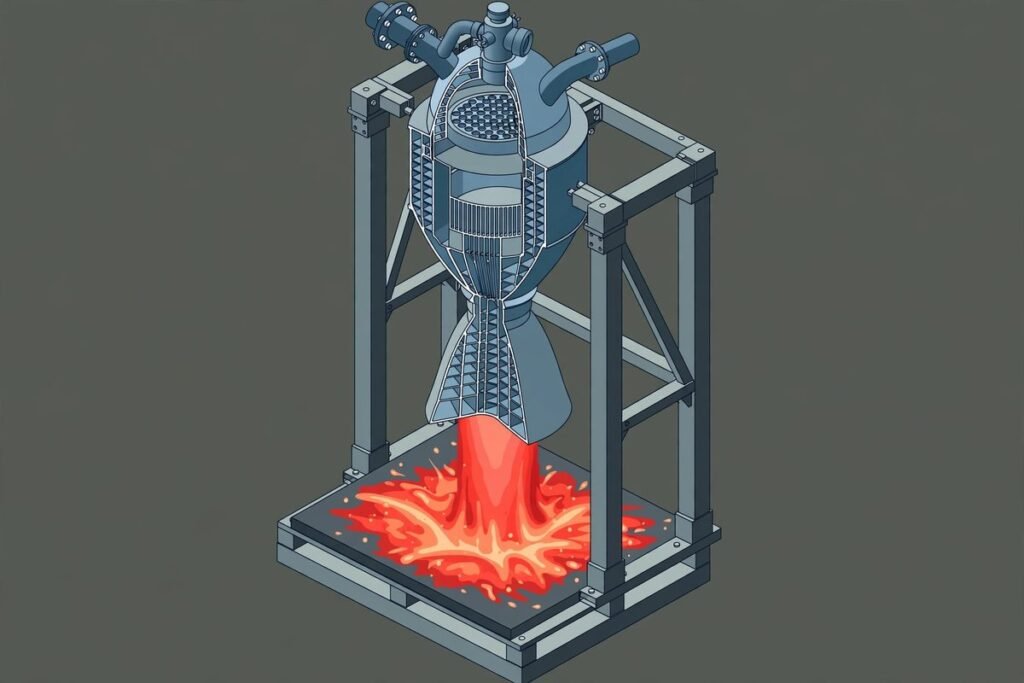
If you have ever asked an AI assistant to “draw a diagram of how this works” and received a wobbly box-and-arrow mess with misspelled labels, you are the audience for Anatomy. This agent skill for technical illustrations plugs into Claude Code, Codex, OpenCode and other coding agents, and teaches them to produce detailed, interactive isometric drawings of machines and complex systems — as polished SVG, optionally with WebGL shaders, even in true 3D. The open-source repository (wheresryan22/anatomy, MIT-licensed) has collected more than 16,900 stars and over 1,200 forks, and it is still being actively developed — the latest commit landed the day this article was written. In this deep dive: what Anatomy does, how it works under the hood, its honest limits, and whether your team should care.
What Anatomy actually is
First, some vocabulary. An “agent skill” is the open format defined at agentskills.io that packages reusable instructions an AI coding agent can load: a SKILL.md file at the root of a repository plus supporting files. Think of it as a playbook your agent reads before it acts. Anatomy is one of the most ambitious examples of the format — not a skill that helps your agent write better code, but one that helps it draw.
Install it with npx skills add wheresryan22/anatomy -g (via the skills CLI from Vercel Labs), and a prompt like /anatomy explain how a token bucket rate limiter works, interactive gives you a working visual explanation rather than a wall of text. No API keys, nothing to npm install: the kit uses only Node’s built-in modules.
The core idea is what separates Anatomy from “AI, draw me a thing.” Anatomy asks your agent to explain an idea by building it as a real, working object. A cache key that skips work when nothing changed becomes a pin-tumbler lock that only turns when every pin matches. One GPU context serving many canvases becomes a gantry plotter whose single print head visits sixteen wells. The agent builds that object out of dozens of small, solid, shaded parts, frames it in a card with a title, a hint and a live readout, and makes it move calmly under the pointer and keyboard. Every number the figure shows comes from the same small model that moves its parts — the diagram cannot show a value its mechanism does not believe.
What it can make: three kinds of figure
Anatomy produces three kinds of figure, all sharing one drawing kit, one isometric camera, and one set of craft rules. Light and dark themes are both supported, with the light theme designed first.
- SVG (the core). Solid isometric parts with four-tone shading, painted back to front — as a standalone HTML page, a lone
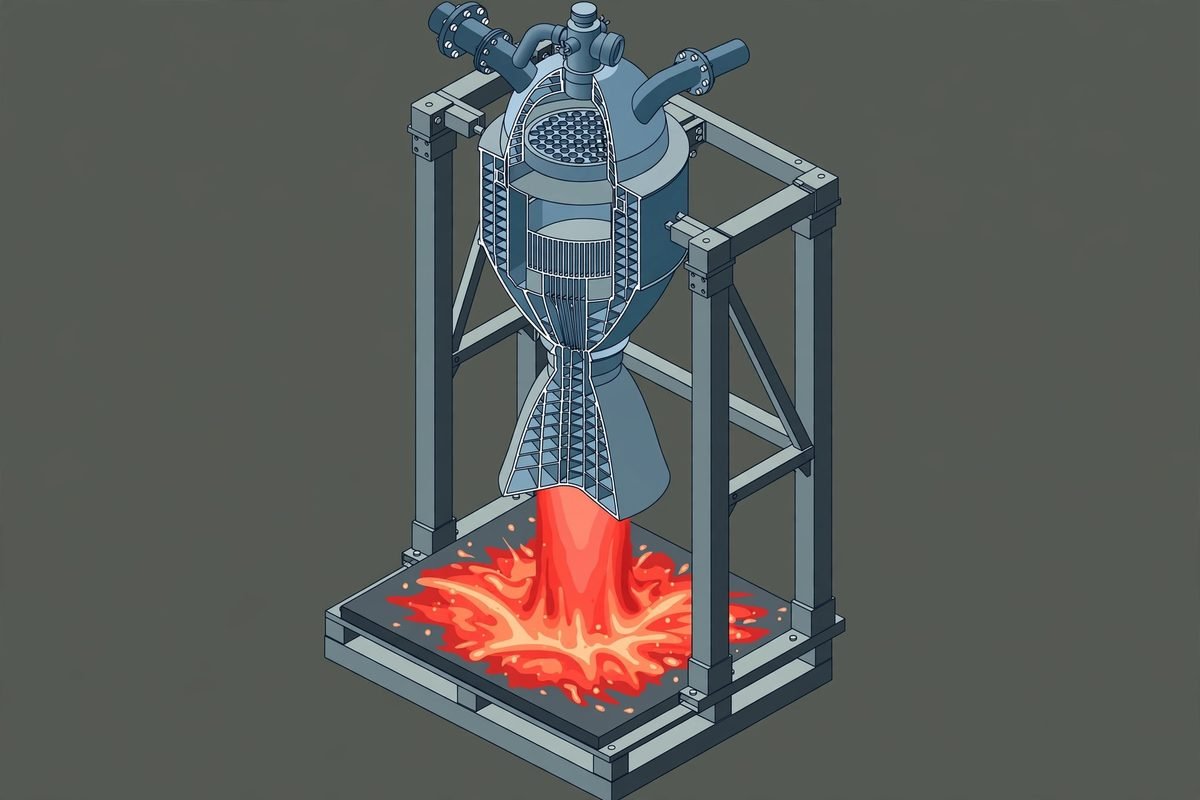
.svgfile with styles embedded, or React/Next.js components. Examples:dial-indicator,desk-computer,arcade-cabinet. - SVG + WebGL. For what lines cannot draw: fire, exhaust, water, caustics, lamp light. The shader runs in a canvas between a back and a front SVG layer, in the figure’s own isometric camera, so it sits inside the drawing. The SVG still reads without WebGL. Showpieces:
raptor-engine(a Raptor 2 in a test stand, exhaust plume as shader) andripple-tank(a wave tank with WebGL lamp light and caustics). - 3D (beta). Parts that turn in true 3D: a dial that spins, fingers that flex. The moving parts are re-projected and re-shaded every frame; the rest stays static art. Demo:
turning-dial, about 90 parts re-projected live as you drag.
Eight complete figures ship in examples/ with the built pages committed — open any .html in a browser. The Raptor engine disassembles into 11 assemblies on hover, and an automated audit checks that no pipe passes through anything in any frame.
An agent skill for technical illustrations: how it works
SKILL.md— the workflow the agent reads: collect the true numbers first, invent the object, write a parts list, plan the world, build the geometry once with the kit, paint back to front, frame it, make it live, then verify it like a critic.kit/— the drawing library: the isometric camera, solids and parts library (iso-kit),lathe.mjsfor round parts,tube.mjsfor pipes and cables,gl.mjsfor the WebGL layer, theturn*.mjs3D runtime, and React components. Zero dependencies apart from React for those components.references/— long-form guides the agent opens as needed: craft, the kit API, motion, verification, WebGL, the 3D mode.
The interesting layer is the verification pipeline. kit/audit.mjs proves the geometry: nothing passes through anything, every end sits on a mount, every overlap in depth order (node build.mjs --audit). Headless-Chrome scripts take screenshots and close-ups (capture.mjs, drive.mjs); lines.mjs fails any line that ends in mid-air; turn-check.mjs validates 3D figures. And the skill instructs the agent to read every PNG it makes. This is the craft discipline most AI-generated visuals lack: the output is audited, not just rendered.
Getting started: five real steps
- 1. Requirements. Node.js 20.10+ (builds, kit, checks), Chrome or Chromium (the checks drive it headless; set
CHROME_PATHif needed), React 18+ only for React output. - 2. Install.
npx skills add wheresryan22/anatomy -g— the CLI asks which agents to set up (Claude Code, Antigravity, OpenCode, Codex, MiniMax Code); add-a claude-codeto target one. Alternative:git clone https://github.com/wheresryan22/anatomy.git ~/.claude/skills/anatomy, or download the repo ZIP and drop it in the same folder. - 3. Prompt it.
/anatomy explain how a token bucket rate limiter works, interactive(in Codex:$anatomy). Be specific about the real numbers and the mechanism — the skill’s first rule is “collect the true numbers first,” and a vague prompt gets a vague figure. - 4. Study the examples. Open any committed
.htmlinexamples/. Trydial-indicator(about 300 lines, the smallest) to see the structure of a figure before asking for your own. - 5. Share. Ask your agent to “publish this figure to the Anatomy community gallery” — it shows you what it will send, then opens a PR on the
anatomy-communityrepo for you.
Why it is trending: the problem it actually solves
Anatomy rides three waves at once. First, the agent-skills format itself is exploding — every major coding agent loads skills now, and a skill that gives your agent an entirely new medium (drafting) stands out in a sea of skills that marginally improve linting.
Second, documentation’s bottleneck is now visual. Teams have learned that AI-written docs are cheap but AI-drawn explanations are usually terrible. Anatomy’s promise is different: figures built with a technical illustrator’s discipline — parts lists, geometry audits, close-ups of every joint — enforced by the skill, not left to the model’s taste. That matters for teams whose docs currently ship hand-drawn diagrams (expensive) or AI slop (embarrassing).
Third, interactive technical content is a competitive moat. A docs page with a live, explorable figure of how your system works keeps readers on the page in a way a static diagram cannot. If you follow our trending GitHub AI repos coverage, you will recognise the pattern: the repos that break out hand developers a capability their tools were missing. Anatomy hands your agent a drafting table.
From our experience: the honest limits
MTD has spent nine years building interactive web experiences, so here is the version you will not get from the launch tweets. The README is unusually candid about limits, and they are real:
- Not a chart library. No axes, no series, no data plots. If your need is “dashboard of our metrics,” this is the wrong tool.
- Machines, instruments, tools, furniture — not people, not exact maps. An idea with no mechanism to build comes out weaker. “Our microservices architecture” has no pins, pipes or gears to draw; you need a physical metaphor, and the agent must invent a good one.
- Slow on purpose. A figure takes a long agent session: parts list, geometry, audit, close-ups of every joint in both themes. A full 3D orbit audit takes 15–20 minutes for 30 parts. This is a craft tool for high-value single figures, not a batch pipeline for a 500-page knowledge base.
- Shaders need WebGL (SVG still reads without it), and 3D is beta — proven on one example plus one test figure. The 380-part stress hand hit ~20fps at 1440px, 13–15 on a throttled phone.
Where we would actually deploy it: onboarding docs for physical products (IoT hardware, robotics, industrial kit), interactive marketing for developer tools with a physical story, and pitch decks where one beautiful mechanism diagram beats ten bullet slides. Budget one long agent session per figure, treat the output like any AI artifact — audit it, have a human verify the numbers — and never ship it straight from the terminal. If that sounds like your team, our AI agent development services build exactly this kind of agent-assisted interactive experience into production sites.
Frequently asked questions
Is Anatomy free to use?
Yes. It is MIT-licensed, free for commercial and personal use, with no API keys and no paid dependencies — the kit uses only Node built-in modules. You need a subscription to whichever AI agent you run it in, but the skill itself costs nothing.
Which AI agents does Anatomy work with?
Written for Claude Code and following the open Agent Skills format, it also loads in Google Antigravity, OpenCode, Codex and MiniMax Code. Install with npx skills add wheresryan22/anatomy -g, adding -a claude-code (or antigravity/opencode/codex/minimax-code) to target one agent. Prompt syntax is /anatomy, or $anatomy in Codex.
Can Anatomy make charts or infographics?
No — an explicit design decision. The README states it plainly: it is not a chart library; there are no axes, series or data plots. Numbers appear as a live readout driven by a model, and as the true sizes and counts of the parts. Use a chart library for data visualisation; Anatomy is for isometric figures of machines and instruments.
Do I need design skills to use Anatomy?
No. The skill encodes the craft rules — isometric camera, four-tone shading, depth-ordered painting, geometry audits — so you prompt in plain English. Specificity pays: the skill’s first instruction is to collect the true numbers before drawing, and a prompt naming the real mechanism and values gets a far better figure than “draw something about caching.”
How long does a figure take to generate?
It is deliberately slow. A full figure takes a long agent session: parts list, geometry, audit, close-ups of every joint in both themes. The Raptor build takes a few minutes; a 3D orbit audit takes 15–20 minutes for 30 parts. Think craft tool for high-value single figures, not a batch pipeline.
Anatomy is a genuinely novel use of the agent-skill format: it turns a code-writing agent into something closer to a technical illustrator, and the geometry-audit verification loop is the craft discipline most AI output desperately needs. It will not draw your charts, it will not draw people, and it will not hurry — but for one beautiful, audited, interactive figure of a machine that matters, nothing else open-source comes close. Browse more tools like it in our AI Tools Directory, or talk to us if you want interactive technical content built into your product.