
A small business AI use policy template should do one job: tell every person on your team which AI tools they may use, what they may put into them, and who checks the work before it leaves the building. If your team already uses ChatGPT, Claude, Gemini or Copilot for real work — and in most small businesses, they do — then the absence of a written rule is itself the risk. This guide gives you a one-page policy you can adopt this week, explains the decisions behind each line, and shows how to roll it out without turning it into another handbook nobody reads. It is general guidance, not legal advice for your specific situation.
Who this is for: any business with roughly five to fifty people where staff draft emails, write proposals, summarise documents, write code or answer customers with AI help. By the end, you will be able to fill in the template below, brief your team in thirty minutes, and answer the question a customer or regulator will eventually ask — “what rules govern how you use AI with our data?” — with a straight answer.
Why a one-page small business AI use policy template beats a 20-page handbook
Small businesses stall on AI policy because it feels like it needs a lawyer, a committee and a risk framework. So nothing gets written, and staff invent their own rules. One person pastes client details into a personal chatbot account. Another refuses to touch AI at all and falls behind. A third uses three unapproved tools with three different logins, and nobody can say where company data went. A short, published policy fixes all three problems at once, because people can actually remember it.
A twenty-page policy also goes out of date before it is approved, because model names, training settings and data controls change every few months. A one-page policy has an owner and a review date, and updating it is a ten-minute job. Review it at least every six months, and sooner when you approve a new tool or a provider changes its data terms in a way that matters to you.
Finally, a ban does not work. Tell people they cannot use AI and they will use it anyway, on their phones, on personal accounts, out of your sight — the worst of every world, because you lose both the productivity and the control. Research published in early 2026 found that a large share of data flowing into AI tools is sensitive, and that a substantial minority of workplace chatbot use still runs through personal accounts outside company control. The fix is a sanctioned route that is easier than the unsafe one: approved tools, work accounts, clear data lines, and a named person to ask.
The small business AI use policy template
Copy the text below, fill in the bracketed fields, and put it where your team will actually see it. Keep it to one page when printed. If a line does not apply to your business, delete it rather than leaving a rule nobody follows.
- 1. Purpose. [Company name] encourages AI use to work faster and better, in a way that protects our customers, our people and our business. This policy covers employees, contractors and freelancers, on any device, whenever the work is for [Company name].
- 2. Approved tools and accounts. Use only the AI tools on the approved list below, signed in with your [Company name] account: [list the tools, for example ChatGPT Business, Microsoft 365 Copilot, Claude for Work]. Ask [policy owner] before using any other AI tool, app or browser extension for work.
- 3. What never goes in. Never enter customer or employee personal data, passwords or access keys, payment details, health information, unreleased financial results, or anything a client has asked us to keep confidential into an AI tool, unless that specific tool has been approved for that specific data. When in doubt, treat it as confidential and ask.
- 4. Check everything. You are responsible for anything you send, publish or ship, including AI-assisted work. Check facts, figures, names, prices, dates, legal wording and code before use. If AI output will reach a customer, a second person checks it first.
- 5. Be honest about AI use. Disclose substantial AI use in customer-facing, published or legal material where a customer would reasonably want to know, and never present AI output as your own verified research, a quote, or a credential you do not hold.
- 6. Decisions about people. AI supports, but never makes, decisions about hiring, pay, promotion, credit or eligibility. A named human reviews any AI-assisted recommendation about a person before it is acted on.
- 7. Agents and automation. An AI agent or workflow may draft and prepare, but it may not send, pay, delete, publish or change a customer record without human approval. Give agents the least access they need, and log what they do.
- 8. If something goes wrong. Stop, do not try to delete the evidence, and tell [policy owner] the same day — including pasting the wrong data into a tool or an AI error that reached a customer. Reporting quickly is never punished; hiding it is.
- 9. Owner and review. Policy owner: [name, role]. Effective: [date]. Next review: [date, no more than six months away].
Green, amber, red: the data rule your team can remember
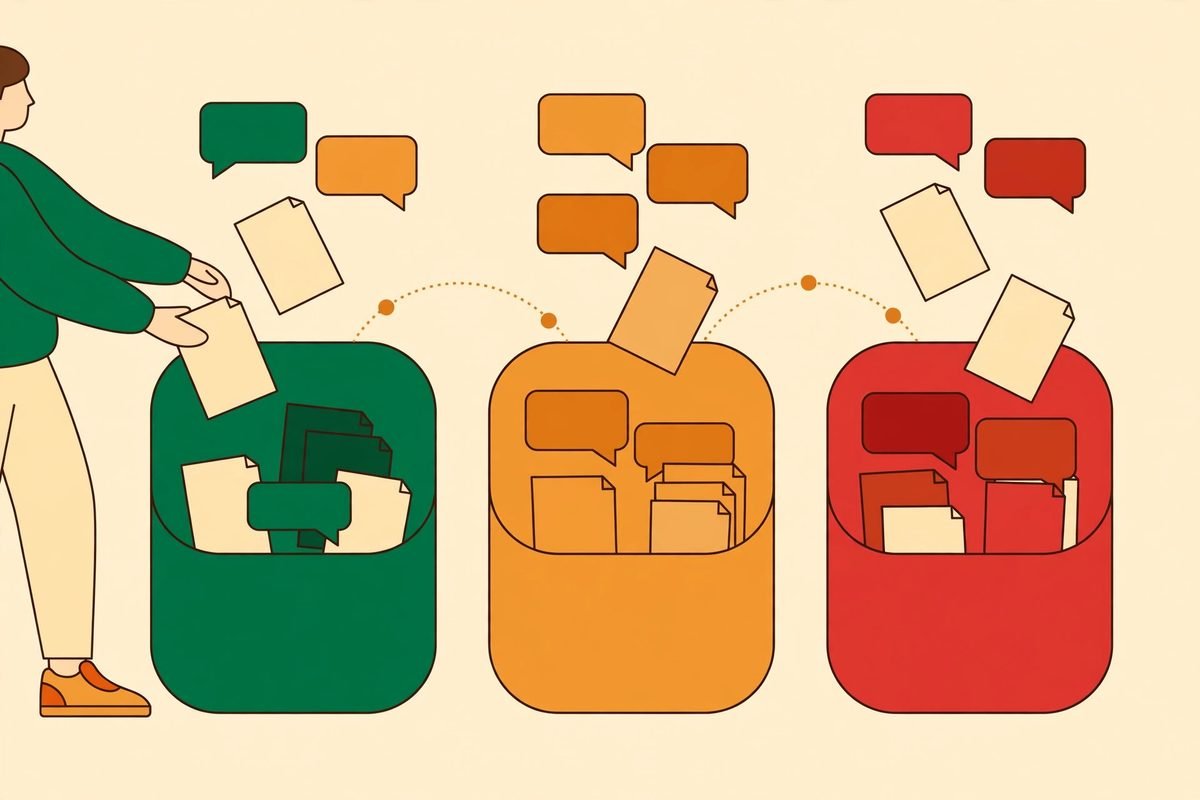
The single most useful idea in any AI policy is a traffic-light data rule. Staff do not remember data-classification frameworks. They remember colours. Several current small-business AI acceptable use policy templates converge on the same three buckets, and a plain-English green, amber and red data rule is the version we recommend adopting exactly, with your own examples filled in:
- Green — safe in any approved tool. Public information, your own first drafts, general questions, published marketing material, and anything already public. Most everyday AI use should live here.
- Amber — approved tools and work accounts only. Internal documents, non-personal business data, internal code, and draft material not yet public. Use placeholders where you can — [Customer] instead of a real name, rounded figures instead of exact ones — and never use a personal account for amber data.
- Red — never, unless a specific tool is approved for it. Customer or employee personal data, credentials, financial detail, health data, and anything under a confidentiality obligation. The test to teach your team is blunt: if you would not email it to a stranger, it does not go into a public or personal AI tool.
Run through five real examples from your own work in the briefing session — a customer email, an invoice, a contract clause, a staff rota, a draft blog post — and ask the room to classify each one. That ten-minute exercise turns an abstract rule into a habit, and it surfaces the awkward cases early: the invoice containing a customer address, the support ticket containing a password a customer pasted in, the spreadsheet with a hidden sheet of personal data. Those are the cases where a vague policy fails and a worked example saves you.
Approved tools and accounts: the rule most templates miss
Most templates say “use approved tools” and stop there. That is not enough, because approval has to cover the account, not just the product name. The same chatbot can treat your data very differently on a personal account and on a business one. On consumer plans, conversations may be used to improve models unless the user opts out; on business and enterprise plans, providers generally exclude workspace data from training by default and add admin controls, single sign-on and audit logs. Details differ by provider and change over time — which is why your policy should name the plan, not just the brand (“ChatGPT Business” rather than “ChatGPT”), and why the owner must re-check the terms at each review.
Practically, do three things. First, pick one sanctioned workspace per job and pay for it if the free tier does not give you the controls you need; a policy that only says no, without a usable approved tool, drives use underground. Second, turn off training use where the setting exists, and confirm it rather than assuming it. Third, use your Microsoft 365 or Google Workspace controls to limit which third-party apps staff can grant access to company data, and make the approved route the path of least resistance. When a new tool is requested, run a short intake check, not a committee: what data will it touch, which account type, what are its training and retention terms, and who is accountable if it leaks? If nobody can answer the first two questions, the tool is not approved yet.
Who checks AI output, and what “checked” actually means
“You own the output” is the most important sentence in the policy, and the vaguest, so define it. Checking means verifying the things AI gets wrong most often: facts, figures, names, prices and dates; quotes and citations that may not exist; legal wording that sounds authoritative and is not; and code that runs in the demo and fails on real data. It does not mean reading every word with equal care. It means a risk-based check: a social post gets a quick read, a client proposal gets a line-by-line check of every number, and anything legal, financial or medical gets a qualified human, not just a second AI.
Set a second-person rule for customer-facing work: the person who generated the output should not be the only person who approves it, at least for proposals, quotes, published content and customer communications. That sounds bureaucratic until the first time it catches a confidently wrong price or a hallucinated product feature in a proposal that was about to go out. It also protects your staff: when a mistake slips through, the question is whether the check happened, not whether someone trusted the tool too much.

Approval lines, agents, and decisions about people
Three lines in the template deserve emphasis, because they are where small policies most often stay silent. First, approval lines: name one owner, not a department. A policy owned by “management” is owned by nobody. The owner approves tools, answers “can I put this in?”, handles incident reports, and runs the six-monthly review. In a five-person business that owner is usually the founder; in a fifty-person business it might be an operations manager with a named deputy.
Second, agents and automation: old policy language about chatbots no longer covers tools that act. An agent that can send email, update a CRM, move money or delete records needs a different rule from a chatbot that drafts text. The template rule — agents may prepare, but a human approves any send, payment, deletion, publication or customer-record change — is deliberately conservative, and it should stay that way until you have logging that shows exactly what an agent did, and a tested way to undo it.
Third, decisions about people: this is where a careless AI habit becomes a legal and reputational problem fastest. Screening CVs, ranking candidates or drafting a disciplinary note with AI assistance all need a human who reads the underlying material, checks for bias, and owns the decision in writing. AI can summarise and suggest; it cannot be the decision-maker, and it cannot be the explanation you give the person affected. If you handle regulated data or operate in several jurisdictions, get qualified legal advice on this section — the template is a starting point, not a substitute for that advice.
From our experience: rolling it out in one week
In our experience building AI workflows for small businesses, the rollout matters more than the wording. A policy emailed on a Friday afternoon with no briefing exists only in a folder. The rollout that sticks takes one week: on day one, the owner fills in the template, picks the approved tools, and confirms the training and account settings with screenshots. On day two or three, the owner runs a single thirty-minute session — the green-amber-red rule, five real examples, the “you own the output” rule, and the incident-reporting line, with time for awkward questions, because the awkward questions are the policy working. On day five, everyone signs a one-line acknowledgement, the policy goes where people can find it, and the approved tools are already signed in on their devices.
Expect two honest frictions. The first is cost: business-tier AI accounts cost real money per seat, and owners sometimes balk after years of free consumer tools. Price it against the alternative — uncontrolled personal-account use of customer data — and against the time the approved tools save once staff stop second-guessing whether they are allowed to use them. The second is scope: someone will ask whether the policy covers AI features inside tools you already use, like email summarisation or meeting transcription. The answer is yes, and the approved list should say so, including meeting-recording consent where that applies in your jurisdiction. If you handle health data, financial services, children’s data or government contracts, you need a fuller governance document and professional advice, and this one-pager becomes its staff-facing summary rather than the whole thing.
Frequently asked questions
Do we really need a small business AI use policy template if only a few staff use AI?
Yes, if anyone on your team uses AI for work at all. The risk is not the number of users; it is a single paste of customer data into a personal account, or a single unchecked AI output reaching a customer. A one-page policy costs an afternoon to adopt and prevents the incident that costs a client relationship.
Can staff put customer data into ChatGPT or Claude?
Not into a personal or free account, and not red-list data into any tool that has not been specifically approved for it. In an approved business workspace with the right controls, some red data may be permitted — but that permission must be explicit, tool by tool, not assumed from the brand name.
What is the difference between an approved tool and an approved account?
The tool is the product; the account is the contract and controls behind it. A business account typically excludes your data from model training by default and adds admin controls and audit logs. A personal account for the same product may do none of those things. Your policy should name both.
How often should we review our AI policy?
At least every six months, and sooner when you approve a new tool, a provider changes its data terms, or you start a new kind of AI use such as agents that act on your systems. Put the review date in the policy itself, with a named owner, so the review actually happens.
Should we ban AI tools we have not approved?
“Not yet approved” is a better default than a blanket ban, paired with a fast approval route and a good sanctioned tool. A ban with no approved alternative drives use underground, where you lose both productivity and control. A short approval check — data touched, account type, training terms — usually takes a day, not a committee cycle.
If you want help turning this template into a working setup — approved tools configured on business accounts, green-amber-red rules built into your team’s actual workflows, and agents with human approval where it matters — that is exactly the kind of practical AI integration and automation work MTD Technologies does for small businesses. With 9+ years and 300+ projects behind us, we build the workflow first and write the policy around how your team really works, not the other way round. Contact us to talk through your team’s AI use, and browse the AI Tools Directory for tools worth evaluating before you approve them.